Android :okhttp+Springmvc文件解析器實現(xiàn)android向服務(wù)器上傳照片
A.前言:為了解決安卓端向服務(wù)器上傳照片的問題
1.獲得相冊權(quán)限,選取照片,取到照片的url
2.使用okhttp訪問服務(wù)器并向服務(wù)器傳照片
3.配置springmvc文件解析器
4.搭建服務(wù)器,獲取數(shù)據(jù)保存照片
B.Android添加一個按鈕和一個ImageView,設(shè)置它的點擊事件,打開相冊選擇照片,解析得到照片的本機url,并把照片顯示到ImageView里
添加權(quán)限:
<uses-permission android:name='android.permission.INTERNET' /><uses-permission android:name='android.permission.ACCESS_NETWORK_STATE' /><uses-permission android:name='android.permission.WRITE_EXTERNAL_STORAGE' /><uses-permission android:name='android.permission.READ_EXTERNAL_STORAGE' /><uses-permission android:name='android.permission.SET_WALLPAPER' />
導(dǎo)包:
compile ’com.squareup.okhttp3:okhttp:3.4.1’
按鈕事件:打開相冊選取照片 調(diào)用startActivityForResult();
protected void onCreate(Bundle savedInstanceState) { super.onCreate(savedInstanceState); setContentView(R.layout.activity_main); Button button=(Button)findViewById(R.id.button );w image=(ImageView) findViewById(R.id.image); button.setOnClickListener(new View.OnClickListener() { @Override public void onClick(View view) {Intent intent = new Intent(Intent.ACTION_PICK, android.provider.MediaStore.Images.Media.EXTERNAL_CONTENT_URI);intent.setDataAndType(MediaStore.Images.Media.EXTERNAL_CONTENT_URI, 'image/*');startActivityForResult(intent, 100); } }); }
重寫onActivityResult()方法解析照片獲得url 覆給全局變量,并把照片顯示到imageView。調(diào)用自定義的uploadImage(),向服務(wù)器發(fā)送數(shù)據(jù)
@Override public void onActivityResult(int requestCode, int resultCode, Intent data) { super.onActivityResult(requestCode, resultCode, data); switch (requestCode) { case 100:switch (resultCode) { case RESULT_OK: Uri uri = data.getData(); img_src = uri.getPath();//這是本機的圖片路徑 ContentResolver cr = this.getContentResolver(); try { Bitmap bitmap = BitmapFactory.decodeStream(cr.openInputStream(uri)); /* 將Bitmap設(shè)定到ImageView */ image.setImageBitmap(bitmap); String[] proj = {MediaStore.Images.Media.DATA}; CursorLoader loader = new CursorLoader(this, uri, proj, null, null, null); Cursor cursor = loader.loadInBackground(); if (cursor != null) {int column_index = cursor.getColumnIndexOrThrow(MediaStore.Images.Media.DATA);cursor.moveToFirst();img_src = cursor.getString(column_index);//圖片實際路徑 } cursor.close(); this.uploadImage(); } catch (FileNotFoundException e) { Log.e('cwd', e.getMessage(), e); } break;}break; } }
實現(xiàn)uploadImage(),使用okhttp向服務(wù)器傳數(shù)據(jù)
public void uploadImage() { Log.d('cwd','uploadImage'); new Thread(new Runnable() { @Override public void run() {File file=new File(img_src);RequestBody requestBody = new MultipartBody.Builder().setType(MultipartBody.FORM) .addFormDataPart('jsonfile', file.getName(), RequestBody.create(MediaType.parse('multipart/form-data'), file))//文件 .build(); Request request = new Request.Builder() .url('http://3i157k1732.qicp.vip/springmvc03/jsonsrc').post(requestBody) .build();OkHttpClient client=new OkHttpClient();client.newCall(request).enqueue(new Callback() { @Override public void onFailure(Call call, IOException e) { Log.d('cwd', '上傳失敗'+e.getLocalizedMessage()); } @Override public void onResponse(Call call, Response response) throws IOException { Log.d('cwd','上傳成功'+response.body().string()); }}); } }).start(); }
C.服務(wù)器端,配置springmvc文件解析器,定義照片數(shù)據(jù)處理的方法
idea導(dǎo)包:
<dependency> <groupId>com.fasterxml.jackson.core</groupId> <artifactId>jackson-annotations</artifactId> <version>2.10.0</version></dependency>
在Springmvc的配置文件中配置文件解析器:注意 bean 的id必須為multipartResolver
<bean class='org.springframework.web.multipart.commons.CommonsMultipartResolver'> <property name='maxUploadSize' value='10485760'/> </bean>
定義處理方法: 必須使用RequestParam來綁定參數(shù),值為okhttp上傳數(shù)據(jù)的key值
注意!!!
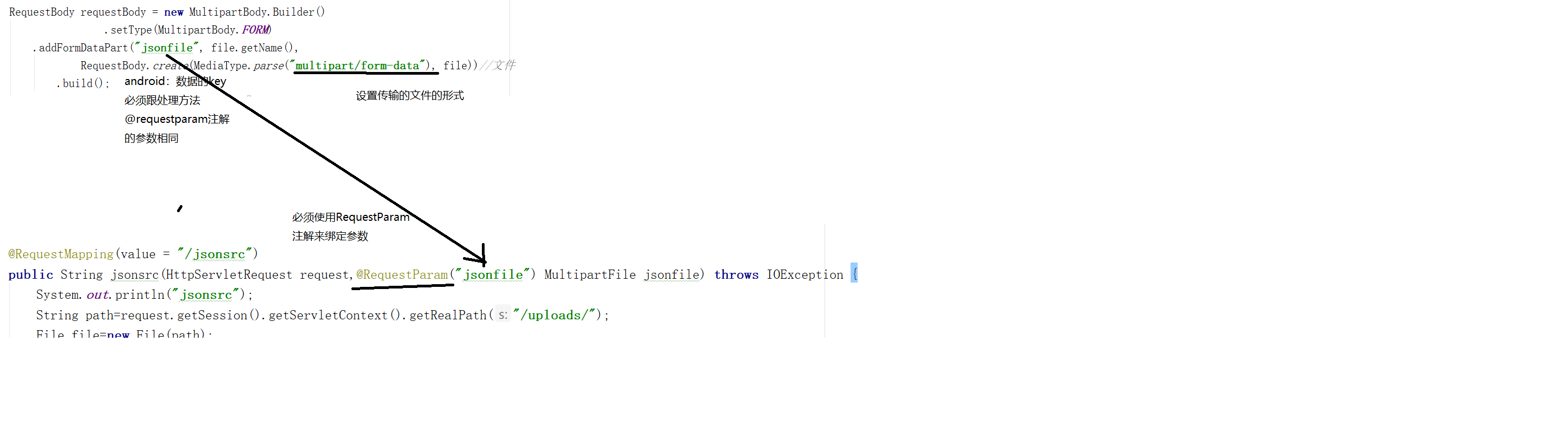
@RequestMapping(value = '/jsonsrc') public String jsonsrc(HttpServletRequest request,@RequestParam('jsonfile') MultipartFile jsonfile) throws IOException { System.out.println('jsonsrc'); String path=request.getSession().getServletContext().getRealPath('/uploads/'); File file=new File(path); if(!file.exists()){ file.mkdir(); } String filename=jsonfile.getOriginalFilename(); String uuid= UUID.randomUUID().toString().replace('-',''); filename=uuid+filename; jsonfile.transferTo(new File(path,filename)); return 'succes'; }
這樣就完成了!!!
okhttp用來訪問網(wǎng)絡(luò),可以拿數(shù)據(jù),也可以向服務(wù)器傳數(shù)據(jù)!
使用springmvc文件解析器,讓我們不用去注重解析文件,只需要保存文件!
總結(jié)
到此這篇關(guān)于Android :okhttp+Springmvc文件解析器實現(xiàn)android向服務(wù)器上傳照片的文章就介紹到這了,更多相關(guān)Android :okhttp+Springmvc文件解析器實現(xiàn)android向服務(wù)器上傳照片內(nèi)容請搜索好吧啦網(wǎng)以前的文章或繼續(xù)瀏覽下面的相關(guān)文章希望大家以后多多支持好吧啦網(wǎng)!
相關(guān)文章:
1. vue 動態(tài)給每個頁面添加title、關(guān)鍵詞和描述的方法2. HTML基礎(chǔ)知識總結(jié)3. Vue select 綁定動態(tài)變量的實例講解4. HTML iframe標(biāo)簽用法案例詳解5. PHP對接阿里云虛擬號的實現(xiàn)(號碼隱私保護)6. PHP基礎(chǔ)之生成器4——比較生成器和迭代器對象7. PHP文件運行步驟以及數(shù)據(jù)庫的連接代碼8. 使用本機IIS?Express開發(fā)Asp.Net?Core應(yīng)用圖文教程9. intellij idea寫Python教程10. HTML-Canvas的優(yōu)越性能以及實際應(yīng)用

 網(wǎng)公網(wǎng)安備