android自定義view用path畫長方形
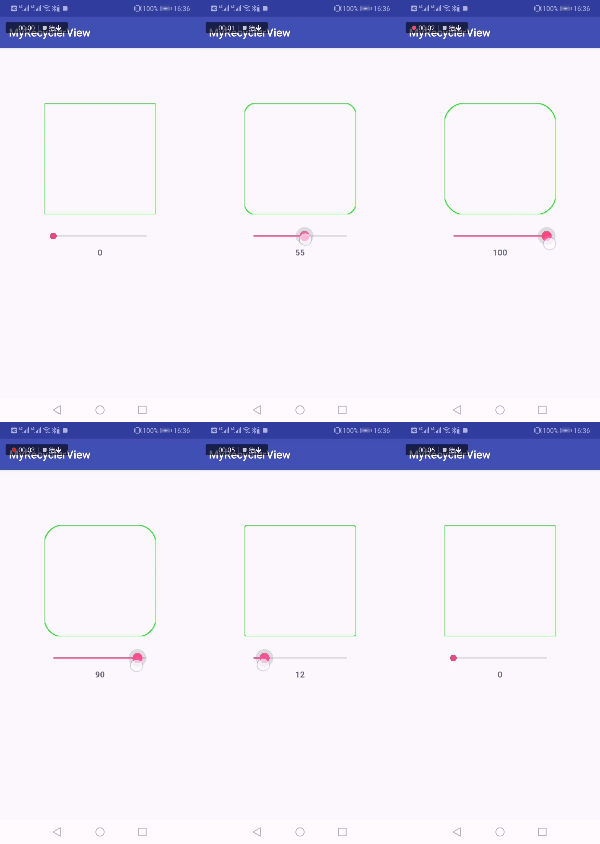
這次主要是練習一下Android的自定義view和path的相關使用,所以做了一個簡單的demo:自定義一個view,并用path在上面畫一個可以動態改變圓角大小的長方形。
自定義相關屬性
自定義view首先需要在values文件夾下建一個attrs文件,并在其中定義view的相關屬性,如下:
<resources> <declare-styleable name='CustomView'> <attr name='round_position'> <flag name='left-top' value='0x1'></flag> <flag name='right-top' value='0x4'></flag> <flag name='left-bottom' value='0x2'></flag> <flag name='right-bottom' value='0x8'></flag> </attr> <attr name='round_radius' format='dimension'></attr> </declare-styleable></resources>
其中round_position指的是圓角的位置,這里屬性類型定為flag(位或運算)這樣就可以在布局中同時使用多個屬性了,類似于EditText中定義文字樣式:android:textStyle='bold|italic';round_radius指圓角大小,類型為dimension。
自定義view類
新建一個類繼承View,如下:
public class CustomView extends View { private Paint paint = new Paint(Paint.ANTI_ALIAS_FLAG); private Path path; private int color = Color.GREEN; private final int LEFT_TOP = 0x1; private final int LEFT_BOTTOM = 0x2; private final int RIGHT_TOP = 0x4; private final int RIGHT_BOTTOM = 0x8; private boolean drawLeftTop; private boolean drawLeftBottom; private boolean drawRightTop; private boolean drawRightBottom; private float radius; public CustomView(Context context) { super(context); initDraw(); } public CustomView(Context context, @Nullable AttributeSet attrs) { super(context, attrs); TypedArray typedArray = context.obtainStyledAttributes(attrs, R.styleable.CustomView); int position = typedArray.getInt(R.styleable.CustomView_round_position, 0); radius = typedArray.getDimension(R.styleable.CustomView_round_radius, 0); drawLeftTop = (position & LEFT_TOP) == LEFT_TOP; drawLeftBottom = (position & LEFT_BOTTOM) == LEFT_BOTTOM; drawRightTop = (position & RIGHT_TOP) == RIGHT_TOP; drawRightBottom = (position & RIGHT_BOTTOM) == RIGHT_BOTTOM; typedArray.recycle(); initDraw(); } public CustomView(Context context, @Nullable AttributeSet attrs, int defStyleAttr) { super(context, attrs, defStyleAttr); initDraw(); } private void initDraw() { path = new Path(); paint.setColor(Color.GREEN); paint.setAntiAlias(true); paint.setStrokeWidth((float) 5); paint.setStyle(Paint.Style.STROKE); } @Override protected void onDraw(Canvas canvas) { path.reset();//這里很重要,如果不寫這一行,則每次重繪view后先前繪制的還會存在 path.moveTo(radius, 0); if (drawRightTop) { path.lineTo(getWidth() - radius, 0);// path.cubicTo(radius + getWidth() / 3, 0, radius + getWidth() / 3 * 2, 0, getWidth() - radius, 0); path.cubicTo(getWidth() - radius / 2, 0, getWidth(), radius / 2, getWidth(), radius); } else { path.lineTo(getWidth(), 0);// path.cubicTo(radius + getWidth() / 3, 0, radius + getWidth() / 3 * 2, 0, getWidth(), 0); } path.lineTo(getWidth(), getHeight() - radius);// path.cubicTo(getWidth(), radius + getHeight() / 3, getWidth(), radius + getHeight() / 3 * 2, getWidth(), getHeight() - radius); if (drawRightBottom) { path.cubicTo(getWidth(), getHeight() - radius / 2, getWidth() - radius / 2, getHeight(), getWidth() - radius, getHeight()); } else { path.lineTo(getWidth(), getHeight()); } path.lineTo(radius, getHeight()); if (drawLeftBottom) { path.cubicTo(radius / 2, getHeight(), 0, getHeight() - radius / 2, 0, getHeight() - radius); } else { path.lineTo(0, getHeight()); } path.lineTo(0, radius); if (drawLeftTop) { path.cubicTo(0, radius / 2, radius / 2, 0, radius, 0); } else { path.lineTo(0, 0); path.lineTo(radius, 0); } canvas.drawPath(path, paint); super.onDraw(canvas); } public void setRadius(float radius) { this.radius = radius; } public void refreshView() { invalidate(); }}
這里使用了path和貝塞爾曲線的繪制方法來繪制可動態調整圓角大小的長方形,注意每次重繪時要先調用path.reset()清除之前繪制的path,然后再繪制新的path,不然舊的path還會一直存在。
布局中使用自定義view
<wjc.myrecyclerview.CustomView android: android:layout_width='200dp' android:layout_height='200dp' android:layout_margin='100dp' app:layout_constraintLeft_toLeftOf='parent' app:layout_constraintRight_toRightOf='parent' app:layout_constraintTop_toTopOf='parent' app:round_position='left-bottom|right-bottom|right-top|left-top' />
這樣就完成了一個簡單的自定義可調整圓角的長方形,在MainActivity中進行動態控制:
view.setRadius(progress);view.refreshView();
實現的最終效果
以上就是本文的全部內容,希望對大家的學習有所幫助,也希望大家多多支持好吧啦網。
相關文章:
 網公網安備
網公網安備