Android寫一個實時輸入框功能
我們在做安卓項目時通常都會對Android的 EditText輸入框的內容實時監聽,這里我們就做一個實時監聽框,EditText實時輸入,而TextView實現實時顯示。話不多說,直接上效果圖:
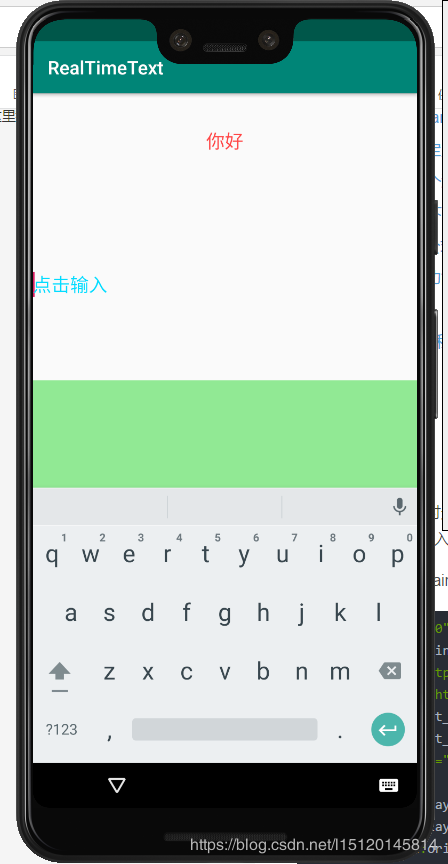
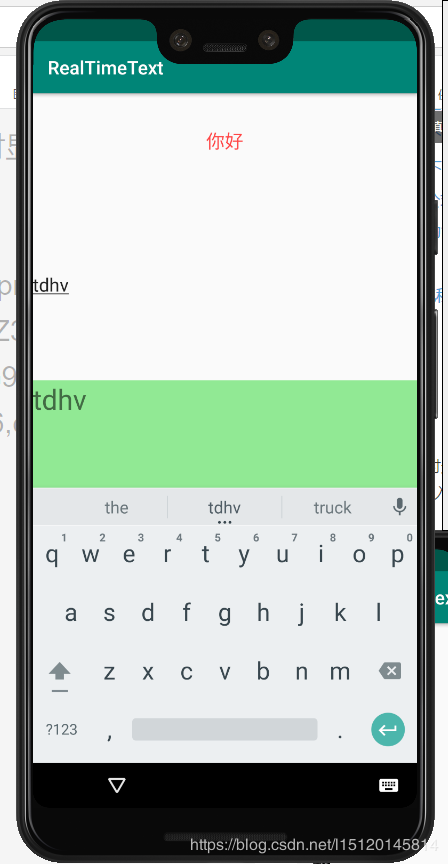
以下是代碼
配置文件activity_main.xml
<?xml version='1.0' encoding='utf-8'?><androidx.constraintlayout.widget.ConstraintLayout xmlns:android='http://schemas.android.com/apk/res/android' xmlns:app='http://schemas.android.com/apk/res-auto' xmlns:tools='http://schemas.android.com/tools' android:layout_width='match_parent' android:layout_height='match_parent' tools:context='.MainActivity'> <LinearLayout android:layout_width='match_parent' android:layout_height='match_parent' android:orientation='vertical'> <TextView android:layout_weight='1' android:layout_width='match_parent' android:layout_height='0dp' android: android:text='你好' android:textSize='20dp' android:textColor='@android:color/holo_red_light' android:gravity='center'/> <EditText android:layout_weight='3' android: android:layout_width='match_parent' android:layout_height='0dp' android:textSize='20sp' android:hint='點擊輸入' android:textColorHint='@android:color/holo_blue_bright' android:background='@null'/> <TextView android:layout_weight='3' android:background='@android:color/holo_blue_light' android: android:layout_width='match_parent' android:layout_height='0dp' android:textSize='30sp'/> </LinearLayout></androidx.constraintlayout.widget.ConstraintLayout>
java文件MainActivity.java:
package com.shiyan.realtimetext;import androidx.appcompat.app.AppCompatActivity;import android.os.Bundle;import android.text.Editable;import android.text.TextWatcher;import android.util.Log;import android.widget.EditText;import android.widget.TextView;public class MainActivity extends AppCompatActivity { private TextView output; private EditText input; @Override protected void onCreate(Bundle savedInstanceState) { super.onCreate(savedInstanceState); setContentView(R.layout.activity_main); input=findViewById(R.id.input); output=findViewById(R.id.output); input.addTextChangedListener(new Watcher()); } private class Watcher implements TextWatcher { @Override public void beforeTextChanged(CharSequence charSequence, int i, int i1, int i2) { } @Override public void onTextChanged(CharSequence charSequence, int i, int i1, int i2) { output.setText(charSequence); } @Override public void afterTextChanged(Editable editable) { } }}
小牢騷:
最開始我還沒有百度過實時輸入框這個東西,然后就自己悶頭做。我的想法是通過開辟一個子線程來實現監聽,然后將這個在EditTex找到id之后就開始運行,發現只要文本框一輸入就開始報錯或者已進入程序就來個白屏。最后再度娘的幫助下成功脫困。
下面看下android 輸入框實時監聽
editText.addTextChangedListener(new TextWatcher() { @Overridepublic void onTextChanged(CharSequence s, int start, int before, int count) { Log.e(TAG, '輸入文字中的狀態,count是輸入字符數'); Log.e(TAG, editText.getText());}@Overridepublic void beforeTextChanged(CharSequence s, int start, int count, int after) { Log.e(TAG, '輸入文本之前的狀態');}@Overridepublic void afterTextChanged(Editable s) { Log.e(TAG, '輸入文字后的狀態');} });
總結
到此這篇關于Android寫一個實時輸入框的文章就介紹到這了,更多相關android 實時輸入框內容請搜索好吧啦網以前的文章或繼續瀏覽下面的相關文章希望大家以后多多支持好吧啦網!
相關文章:

 網公網安備
網公網安備