Vue-pdf實(shí)現(xiàn)在線預(yù)覽PDF文件
在大多數(shù)項(xiàng)目中都會(huì)遇到在線預(yù)覽PDF文件,項(xiàng)目使用的是element ui,使用vue-pdf實(shí)現(xiàn)。
安裝依賴npm install --save vue-pdf相關(guān)參數(shù)
參數(shù)介紹:
url :pdf 文件的路徑,可以是本地路徑,也可以是在線路徑。 page: 當(dāng)前顯示的頁(yè)數(shù),比如第一頁(yè)page=1 rotate : 旋轉(zhuǎn)角度,比如0就是不旋轉(zhuǎn),+90,-90 就是水平旋轉(zhuǎn)。 progress :當(dāng)前頁(yè)面的加載進(jìn)度,范圍是0-1 ,等于1的時(shí)候代表當(dāng)前頁(yè)已經(jīng)完全加載完成了。 page-loaded :頁(yè)面加載成功的回調(diào)函數(shù),不咋能用到。 num-pages :總頁(yè)數(shù) error :加載錯(cuò)誤的回調(diào) link-clicked:?jiǎn)螜C(jī)pdf內(nèi)的鏈接會(huì)觸發(fā)。 print 這個(gè)是打印函數(shù)。 注意:谷歌瀏覽器會(huì)出現(xiàn)亂碼,這個(gè)和字體有關(guān)系。 實(shí)現(xiàn)<template> <div><el-row> <el-button @click='onPreview' size='small'>預(yù)覽</el-button></el-row><el-dialog :visible.sync='viewVisible' center @close=’closePreview’> <el-row :gutter='20'><span>共{{pageCount}}頁(yè), 當(dāng)前第 {{pdfPage}} 頁(yè) </span><el-button type='text' size='mini' @click.stop='previousPage'>上一頁(yè)</el-button><el-button type='text' size='mini' @click.stop='nextPage'>下一頁(yè)</el-button> </el-row> <div><pdf :src='http://www.leifengta.com.cn/bcjs/src' :page='pdfPage' @num-pages='pageCount = $event' @page-loaded='pdfPage = $event' style='display: inline-block; width: 100%'></pdf> </div></el-dialog> </div></template><script>import pdf from ’vue-pdf’import store from ’@/store/’export default { components:{pdf }, data(){return { viewVisible: false, src: null, pdfPage : 1, pageCount: 0, token: store.getters.access_token,} }, methods:{onPreview(){ this.src = pdf.createLoadingTask({url: ’http://localhost:8082/file/demo.pdf’,httpHeaders: {Authorization:’Bearer ’+ this.token} }); this.src.promise.then(pdf => {this.viewVisible = true; });},closePreview(){ this.pdfPage = 1;},previousPage(){ let p = this.pdfPage p = p > 1 ? p-1 : this.pageCount this.pdfPage = p},nextPage(){ let p = this.pdfPage p = p < this.pageCount ? p+1 : 1 this.pdfPage = p} }}</script>效果
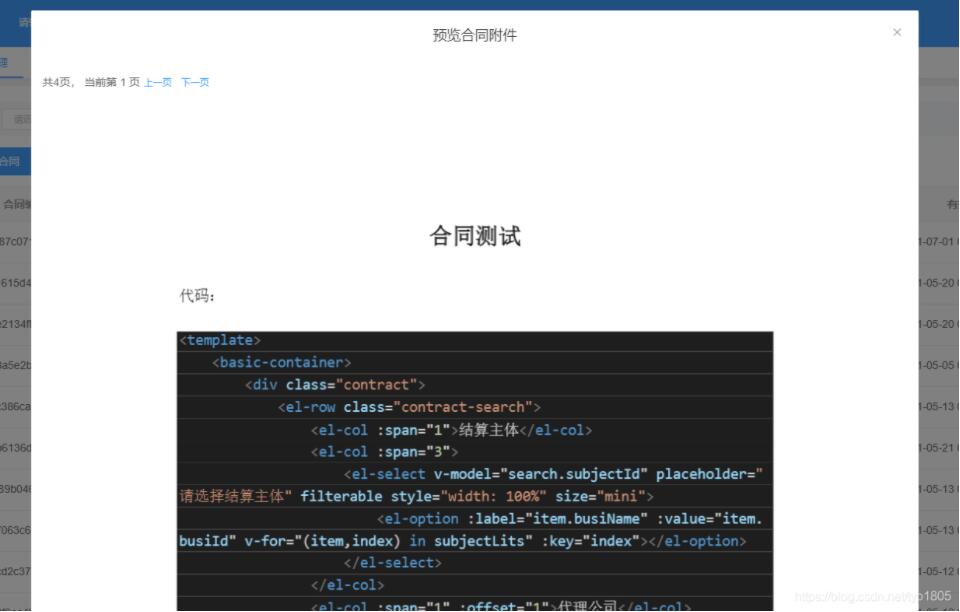
1、URL
url為文件地址路徑
this.src = pdf.createLoadingTask({ url: ’http://localhost:8082/file/demo.pdf’,});
2、設(shè)置請(qǐng)求頭
可以通過httpHeaders來(lái)設(shè)置token等參數(shù)
httpHeaders: {Authorization:’Bearer ’+ this.token}
3、src
這點(diǎn)比較重要,網(wǎng)上很多帖子都是這樣的
this.src.then(pdf => { this.viewVisible = true;})
會(huì)報(bào)錯(cuò) TypeError: this.src.then is not a function
TypeError: this.src.then is not a function at VueComponent.onPreview (index.vue?6ced:241) at click (index.vue?aaff:261) at invokeWithErrorHandling (vue.runtime.esm.js?2b0e:1854) at VueComponent.invoker (vue.runtime.esm.js?2b0e:2179) at invokeWithErrorHandling (vue.runtime.esm.js?2b0e:1854) at VueComponent.Vue.$emit (vue.runtime.esm.js?2b0e:3888) at VueComponent.handleClick (element-ui.common.js?5c96:9413) at invokeWithErrorHandling (vue.runtime.esm.js?2b0e:1854) at HTMLButtonElement.invoker (vue.runtime.esm.js?2b0e:2179) at HTMLButtonElement.original._wrapper (vue.runtime.esm.js?2b0e:6917)
正確的是這樣的
this.src.promise.then(pdf => { this.viewVisible = true;});
以上就是本文的全部?jī)?nèi)容,希望對(duì)大家的學(xué)習(xí)有所幫助,也希望大家多多支持好吧啦網(wǎng)。
相關(guān)文章:
1. ASP新手必備的基礎(chǔ)知識(shí)2. asp文件用什么軟件編輯3. CentOS郵箱服務(wù)器搭建系列——SMTP服務(wù)器的構(gòu)建( Postfix )4. js實(shí)現(xiàn)計(jì)算器功能5. golang中json小談之字符串轉(zhuǎn)浮點(diǎn)數(shù)的操作6. 通過IEAD+Maven快速搭建SSM項(xiàng)目的過程(Spring + Spring MVC + Mybatis)7. 利用CSS制作3D動(dòng)畫8. IDEA 2020.1.2 安裝教程附破解教程詳解9. Vue axios獲取token臨時(shí)令牌封裝案例10. JS中6個(gè)對(duì)象數(shù)組去重的方法
 網(wǎng)公網(wǎng)安備