Vue和Flask通信的實(shí)現(xiàn)
這里我們通過axios來連接Vue前端和Flask后端,使用AJAX請求進(jìn)行通信。使用如下命令安裝
npm install axios
axios的使用格式:
import axios from ’axios’; export default { data: function () { return {serverResponse: ’res_test’ }; }, methods: { getData() {// 設(shè)置對應(yīng)python的接口,這里使用的是localhost:5000const path = ’http://127.0.0.1:5000/getMsg’;// 這里要使用 res =>表示返回的數(shù)據(jù)axios.get(path).then(res => { // 這里服務(wù)器返回response為一個(gè)json對象 // 通過.data來訪返回的數(shù)據(jù),然后在通過.變量名進(jìn)行訪問 // 可以直接通過response.data取得key-value var msg = res.data.msg; this.serverResponse = msg; // 因?yàn)椴荒苤苯邮褂胻his作為指針,因此在這之前將this賦給了then指針 alter(’Success’ + response.status + ’,’ + response.data + ’,’ + msg); // 成功后顯示提示}).catch(error => { console.error(error);}); } }, }代碼及演示前端代碼
對./components/HelloWorld.vue文件進(jìn)行改寫。代碼如下:
<!-- html部分 --><template> <div> <span>{{ serverResponse }}</span> <!--這里使用{{}}來引用JavaScript中賦給this的值--> <button @click='getData'>get data</button> </div></template><!-- js部分 --><script> import axios from ’axios’; export default { data: function () { return {serverResponse: ’res_test’ }; }, methods: { getData() {// 設(shè)置對應(yīng)python的接口,這里使用的是localhost:5000const path = ’http://127.0.0.1:5000/getMsg’;axios.get(path).then(res => { // 這里服務(wù)器返回response為一個(gè)json對象 // 通過.data來訪返回的數(shù)據(jù),然后在通過.變量名進(jìn)行訪問 // 可以直接通過response.data取得key-value var msg = res.data.msg; this.serverResponse = msg; // 因?yàn)椴荒苤苯邮褂胻his作為指針,因此在這之前將this賦給了then指針 alter(’Success’ + response.status + ’,’ + response.data + ’,’ + msg); // 成功后顯示提示}).catch(error => { console.error(error);}); } }, }</script><!-- css部分 --><!-- Add 'scoped' attribute to limit CSS to this component only --><style scoped> h1, h2 { font-weight: normal; } ul { list-style-type: none; padding: 0; } li { display: inline-block; margin: 0 10px; } a { color: #42b983; }</style>
這里主要實(shí)現(xiàn)了通過單擊按鈕來和服務(wù)器端進(jìn)行交互獲得數(shù)據(jù)并傳回前端,將得到的數(shù)據(jù)重新來對前端進(jìn)行渲染。
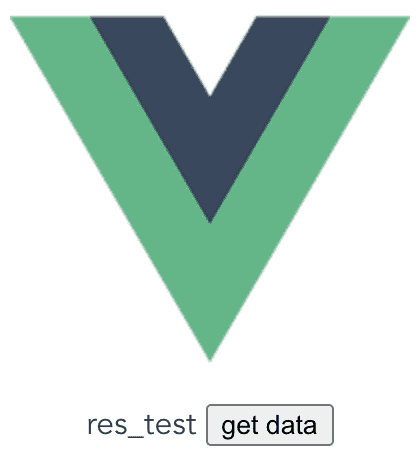
得到如上頁面之后,我們單擊get date按鈕,就會(huì)像后端發(fā)送GET請求,后端服務(wù)器監(jiān)聽到請求之后就會(huì)返回對應(yīng)的數(shù)據(jù)。

from flask import Flaskfrom flask import jsonifyfrom flask_cors import CORSapp = Flask(__name__)cors = CORS(app, resources={r'/getMsg': {'origins': '*'}})@app.route(’/’)def hello_world(): return ’test!’# 監(jiān)聽127.0.0.1:5000/getMsg請求@app.route(’/getMsg’, methods=[’GET’, ’POST’])def home(): response = {’msg’: ’Hello, Python !’ } return responseif __name__ == ’__main__’: app.run()
到此這篇關(guān)于Vue和Flask通信的實(shí)現(xiàn)的文章就介紹到這了,更多相關(guān)Vue和Flask通信內(nèi)容請搜索好吧啦網(wǎng)以前的文章或繼續(xù)瀏覽下面的相關(guān)文章希望大家以后多多支持好吧啦網(wǎng)!
相關(guān)文章:
1. ASP新手必備的基礎(chǔ)知識(shí)2. PHP基礎(chǔ)之生成器4——比較生成器和迭代器對象3. asp文件用什么軟件編輯4. CentOS郵箱服務(wù)器搭建系列——SMTP服務(wù)器的構(gòu)建( Postfix )5. golang中json小談之字符串轉(zhuǎn)浮點(diǎn)數(shù)的操作6. js實(shí)現(xiàn)計(jì)算器功能7. JS中6個(gè)對象數(shù)組去重的方法8. Vue axios獲取token臨時(shí)令牌封裝案例9. 利用CSS制作3D動(dòng)畫10. 通過IEAD+Maven快速搭建SSM項(xiàng)目的過程(Spring + Spring MVC + Mybatis)
 網(wǎng)公網(wǎng)安備