IDEA Servlet 模板設置的方法
IDEA Servlet 模板
1. 打開模板設置
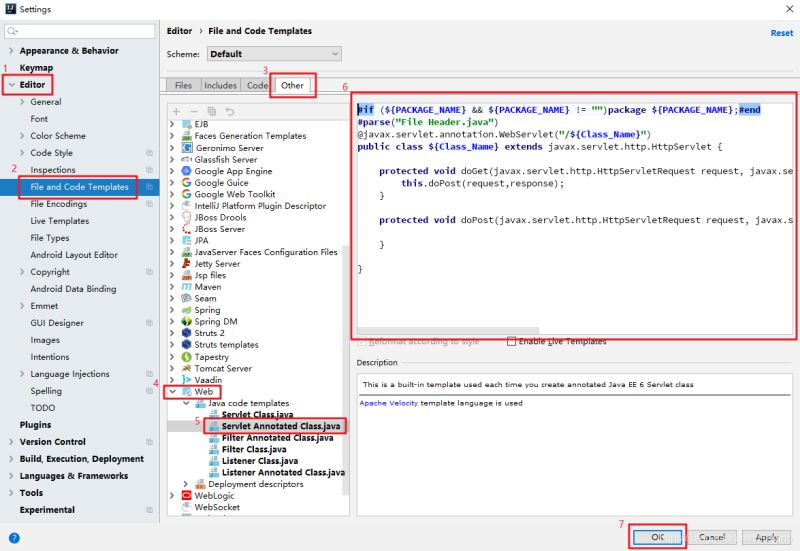
2. 替換模板內容
#if (${PACKAGE_NAME} && ${PACKAGE_NAME} != '')package ${PACKAGE_NAME};#end#parse('File Header.java')@javax.servlet.annotation.WebServlet('/${Class_Name}')public class ${Class_Name} extends javax.servlet.http.HttpServlet { protected void doGet(javax.servlet.http.HttpServletRequest request, javax.servlet.http.HttpServletResponse response) throws javax.servlet.ServletException, java.io.IOException { this.doPost(request,response); } protected void doPost(javax.servlet.http.HttpServletRequest request, javax.servlet.http.HttpServletResponse response) throws javax.servlet.ServletException, java.io.IOException { }}
3. 新建 Servlet
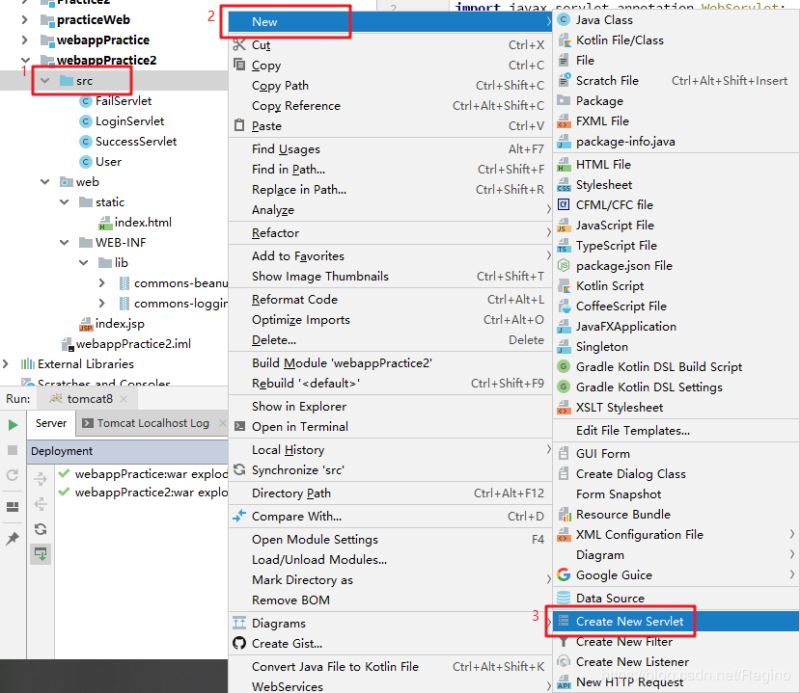
4. 效果輸入類名即可自動創建 Servlet 文件:
import javax.servlet.ServletException;import javax.servlet.annotation.WebServlet;import javax.servlet.http.HttpServlet;import javax.servlet.http.HttpServletRequest;import javax.servlet.http.HttpServletResponse;import java.io.IOException;@WebServlet('/Servlet')public class Servlet extends HttpServlet { protected void doGet(HttpServletRequest request, HttpServletResponse response) throws ServletException, IOException { this.doPost(request, response); } protected void doPost(HttpServletRequest request, HttpServletResponse response) throws ServletException, IOException { }}
總結
到此這篇關于IDEA Servlet 模板設置的方法的文章就介紹到這了,更多相關IDEA Servlet 模板設置內容請搜索好吧啦網以前的文章或繼續瀏覽下面的相關文章希望大家以后多多支持好吧啦網!
相關文章:
 網公網安備
網公網安備