Python爬蟲實戰之使用Scrapy爬取豆瓣圖片
以莫妮卡·貝魯奇為例

1.首先我們在命令行進入到我們要創建的目錄,輸入 scrapy startproject banciyuan 創建scrapy項目
創建的項目結構如下
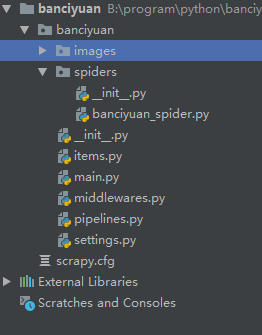
2.為了方便使用pycharm執行scrapy項目,新建main.py
from scrapy import cmdlinecmdline.execute('scrapy crawl banciyuan'.split())
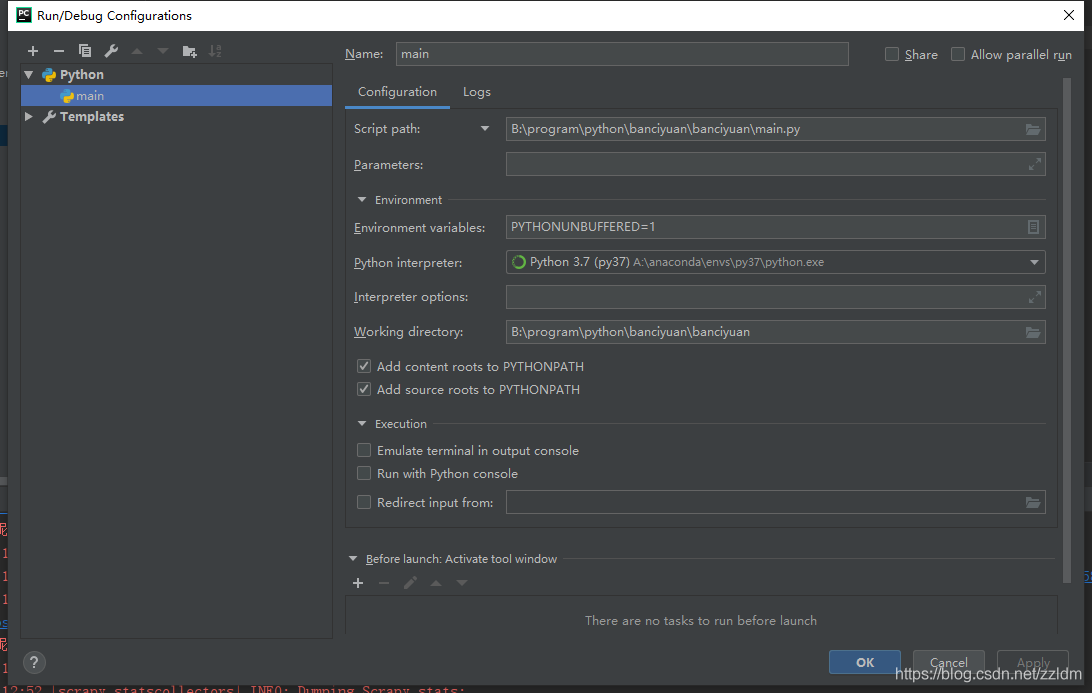
再edit configuration
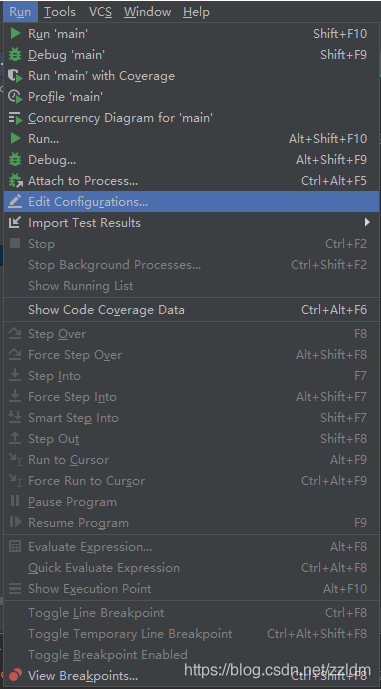
然后進行如下設置,設置后之后就能通過運行main.py運行scrapy項目了
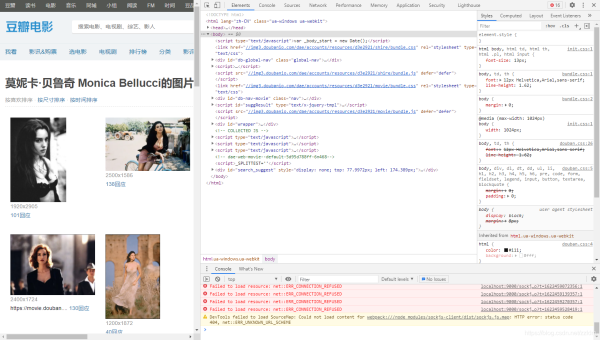
3.分析該HTML頁面,創建對應spider
from scrapy import Spiderimport scrapyfrom banciyuan.items import BanciyuanItemclass BanciyuanSpider(Spider): name = ’banciyuan’ allowed_domains = [’movie.douban.com’] start_urls = ['https://movie.douban.com/celebrity/1025156/photos/'] url = 'https://movie.douban.com/celebrity/1025156/photos/' def parse(self, response):num = response.xpath(’//div[@class='paginator']/a[last()]/text()’).extract_first(’’)print(num)for i in range(int(num)): suffix = ’?type=C&start=’ + str(i * 30) + ’&sortby=like&size=a&subtype=a’ yield scrapy.Request(url=self.url + suffix, callback=self.get_page) def get_page(self, response):href_list = response.xpath(’//div[@class='article']//div[@class='cover']/a/@href’).extract()# print(href_list)for href in href_list: yield scrapy.Request(url=href, callback=self.get_info) def get_info(self, response):src = response.xpath( ’//div[@class='article']//div[@class='photo-show']//div[@class='photo-wp']/a[1]/img/@src’).extract_first(’’)title = response.xpath(’//div[@id='content']/h1/text()’).extract_first(’’)# print(response.body)item = BanciyuanItem()item[’title’] = titleitem[’src’] = [src]yield item
4.items.py
# Define here the models for your scraped items## See documentation in:# https://docs.scrapy.org/en/latest/topics/items.htmlimport scrapyclass BanciyuanItem(scrapy.Item): # define the fields for your item here like: src = scrapy.Field() title = scrapy.Field()
pipelines.py
# Define your item pipelines here## Don’t forget to add your pipeline to the ITEM_PIPELINES setting# See: https://docs.scrapy.org/en/latest/topics/item-pipeline.html# useful for handling different item types with a single interfacefrom itemadapter import ItemAdapterfrom scrapy.pipelines.images import ImagesPipelineimport scrapyclass BanciyuanPipeline(ImagesPipeline): def get_media_requests(self, item, info):yield scrapy.Request(url=item[’src’][0], meta={’item’: item}) def file_path(self, request, response=None, info=None, *, item=None):item = request.meta[’item’]image_name = item[’src’][0].split(’/’)[-1]# image_name.replace(’.webp’, ’.jpg’)path = ’%s/%s’ % (item[’title’].split(’ ’)[0], image_name)return path
settings.py
# Scrapy settings for banciyuan project## For simplicity, this file contains only settings considered important or# commonly used. You can find more settings consulting the documentation:## https://docs.scrapy.org/en/latest/topics/settings.html# https://docs.scrapy.org/en/latest/topics/downloader-middleware.html# https://docs.scrapy.org/en/latest/topics/spider-middleware.htmlBOT_NAME = ’banciyuan’SPIDER_MODULES = [’banciyuan.spiders’]NEWSPIDER_MODULE = ’banciyuan.spiders’# Crawl responsibly by identifying yourself (and your website) on the user-agentUSER_AGENT = {’User-Agent’:’Mozilla/5.0 (Windows NT 10.0; Win64; x64) AppleWebKit/537.36 (KHTML, like Gecko) Chrome/71.0.3578.80 Safari/537.36’}# Obey robots.txt rulesROBOTSTXT_OBEY = False# Configure maximum concurrent requests performed by Scrapy (default: 16)#CONCURRENT_REQUESTS = 32# Configure a delay for requests for the same website (default: 0)# See https://docs.scrapy.org/en/latest/topics/settings.html#download-delay# See also autothrottle settings and docs#DOWNLOAD_DELAY = 3# The download delay setting will honor only one of:#CONCURRENT_REQUESTS_PER_DOMAIN = 16#CONCURRENT_REQUESTS_PER_IP = 16# Disable cookies (enabled by default)#COOKIES_ENABLED = False# Disable Telnet Console (enabled by default)#TELNETCONSOLE_ENABLED = False# Override the default request headers:#DEFAULT_REQUEST_HEADERS = {# ’Accept’: ’text/html,application/xhtml+xml,application/xml;q=0.9,*/*;q=0.8’,# ’Accept-Language’: ’en’,#}# Enable or disable spider middlewares# See https://docs.scrapy.org/en/latest/topics/spider-middleware.html#SPIDER_MIDDLEWARES = {# ’banciyuan.middlewares.BanciyuanSpiderMiddleware’: 543,#}# Enable or disable downloader middlewares# See https://docs.scrapy.org/en/latest/topics/downloader-middleware.html#DOWNLOADER_MIDDLEWARES = {# ’banciyuan.middlewares.BanciyuanDownloaderMiddleware’: 543,#}# Enable or disable extensions# See https://docs.scrapy.org/en/latest/topics/extensions.html#EXTENSIONS = {# ’scrapy.extensions.telnet.TelnetConsole’: None,#}# Configure item pipelines# See https://docs.scrapy.org/en/latest/topics/item-pipeline.htmlITEM_PIPELINES = { ’banciyuan.pipelines.BanciyuanPipeline’: 1,}IMAGES_STORE = ’./images’# Enable and configure the AutoThrottle extension (disabled by default)# See https://docs.scrapy.org/en/latest/topics/autothrottle.html#AUTOTHROTTLE_ENABLED = True# The initial download delay#AUTOTHROTTLE_START_DELAY = 5# The maximum download delay to be set in case of high latencies#AUTOTHROTTLE_MAX_DELAY = 60# The average number of requests Scrapy should be sending in parallel to# each remote server#AUTOTHROTTLE_TARGET_CONCURRENCY = 1.0# Enable showing throttling stats for every response received:#AUTOTHROTTLE_DEBUG = False# Enable and configure HTTP caching (disabled by default)# See https://docs.scrapy.org/en/latest/topics/downloader-middleware.html#httpcache-middleware-settings#HTTPCACHE_ENABLED = True#HTTPCACHE_EXPIRATION_SECS = 0#HTTPCACHE_DIR = ’httpcache’#HTTPCACHE_IGNORE_HTTP_CODES = []#HTTPCACHE_STORAGE = ’scrapy.extensions.httpcache.FilesystemCacheStorage’
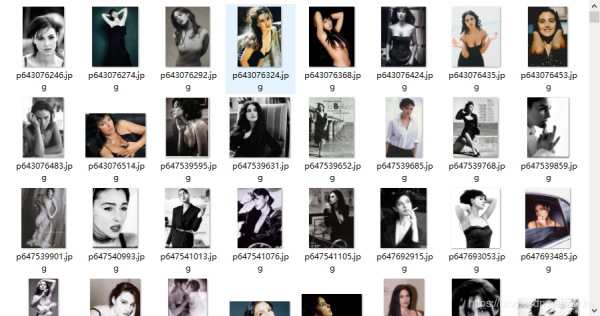
5.爬取結果
reference
源碼
到此這篇關于Python爬蟲實戰之使用Scrapy爬取豆瓣圖片的文章就介紹到這了,更多相關Scrapy爬取豆瓣圖片內容請搜索好吧啦網以前的文章或繼續瀏覽下面的相關文章希望大家以后多多支持好吧啦網!
相關文章:
 網公網安備
網公網安備