文章詳情頁
Win10使用PowerShelll讓Cortana朗讀小說的操作技巧
瀏覽:279日期:2022-10-08 16:20:03
Win10如何使用PowerShelll讓Cortana朗讀小說?Cortana是Win10系統的人工智能助手,可以幫忙處理一些基本任務,比如日程安排、回答問題等,其實Cortana還有更為強大的功能,比如讓Cortana為我們朗讀小說,這才不浪費Cortana甜美的聲音嘛!下面給大家介紹Win10使用PowerShelll讓Cortana朗讀小說的操作技巧。
圖1:Cortana
圖2:來至微軟小娜的問候
Win10如何使用PowerShelll讓Cortana朗讀小說?
1、把下面的代碼復制為.ps1文件保存好,打開PowerShell(管理員),把執行.ps1文件。當然也可以復制之后直接執行命令,都是一樣的效果。
01= "HKLM:SOFTWAREMicrosoftSpeech_OneCoreVoicesTokensMSTTS_V110_zhCN_HongyuM"02= "HKLM:SOFTWAREMicrosoftSpeech_OneCoreVoicesTokensMSTTS_V110_zhCN_HongyuMAttributes"03= "HKLM:SOFTWAREMicrosoftSpeechVoicesTokensMSTTS_V110_zhCN_HongyuM"04= "HKLM:SOFTWAREMicrosoftSpeechVoicesTokensMSTTS_V110_zhCN_HongyuMAttributes"05New-Item -Path ,,,06New-ItemProperty -Path , -Name "(default)" -PropertyType string -Value "Microsoft Hongyu Mobile - Chinese (Simplified, PRC)"07New-ItemProperty -Path , -Name LangDataPath -PropertyType string -Value "%windir%Speech_OneCoreEnginesTTSzh-CNMSTTSLoczhCN.dat"08New-ItemProperty -Path , -Name LangUpdateDataDirectory -PropertyType string -Value "%SystemDrive%DataSharedDataSpeech_OneCoreEnginesTTSzh-CN"09New-ItemProperty -Path , -Name VoicePath -PropertyType string -Value "%windir%Speech_OneCoreEnginesTTSzh-CNM2052Hongyu"10New-ItemProperty -Path , -Name VoiceUpdateDataDirectory -PropertyType string -Value "%SystemDrive%DataSharedDataSpeech_OneCoreEnginesTTSzh-CN"11New-ItemProperty -Path , -Name 804 -PropertyType string -Value "Microsoft Hongyu Mobile - Chinese (Simplified, PRC)"12New-ItemProperty -Path , -Name CLSID -PropertyType string -Value "{179F3D56-1B0B-42B2-A962-59B7EF59FE1B}"13New-ItemProperty -Path , -Name Version -PropertyType string -Value "11.0"14New-ItemProperty -Path , -Name Language -PropertyType string -Value "804"15New-ItemProperty -Path , -Name Gender -PropertyType string -Value "Female"16New-ItemProperty -Path , -Name Age -PropertyType string -Value "Adult"17New-ItemProperty -Path , -Name DataVersion -PropertyType string -Value "11.0.2013.1022"18New-ItemProperty -Path , -Name SharedPronunciation -PropertyType string -Value ""19New-ItemProperty -Path , -Name Name -PropertyType string -Value "Microsoft Hongyu Mobile"20New-ItemProperty -Path , -Name Vendor -PropertyType string -Value "Microsoft"21New-ItemProperty -Path , -Name PersonalAssistant -PropertyType string -Value "1"復制代碼= "HKLM:SOFTWAREMicrosoftSpeech_OneCoreVoicesTokensMSTTS_V110_zhCN_HongyuM"= "HKLM:SOFTWAREMicrosoftSpeech_OneCoreVoicesTokensMSTTS_V110_zhCN_HongyuMAttributes"= "HKLM:SOFTWAREMicrosoftSpeechVoicesTokensMSTTS_V110_zhCN_HongyuM"= "HKLM:SOFTWAREMicrosoftSpeechVoicesTokensMSTTS_V110_zhCN_HongyuMAttributes"New-Item -Path ,,,New-ItemProperty -Path , -Name "(default)" -PropertyType string -Value "Microsoft Hongyu Mobile - Chinese (Simplified, PRC)"New-ItemProperty -Path , -Name LangDataPath -PropertyType string -Value "%windir%Speech_OneCoreEnginesTTSzh-CNMSTTSLoczhCN.dat"New-ItemProperty -Path , -Name LangUpdateDataDirectory -PropertyType string -Value "%SystemDrive%DataSharedDataSpeech_OneCoreEnginesTTSzh-CN"New-ItemProperty -Path , -Name VoicePath -PropertyType string -Value "%windir%Speech_OneCoreEnginesTTSzh-CNM2052Hongyu"New-ItemProperty -Path , -Name VoiceUpdateDataDirectory -PropertyType string -Value "%SystemDrive%DataSharedDataSpeech_OneCoreEnginesTTSzh-CN"New-ItemProperty -Path , -Name 804 -PropertyType string -Value "Microsoft Hongyu Mobile - Chinese (Simplified, PRC)"New-ItemProperty -Path , -Name CLSID -PropertyType string -Value "{179F3D56-1B0B-42B2-A962-59B7EF59FE1B}"New-ItemProperty -Path , -Name Version -PropertyType string -Value "11.0"New-ItemProperty -Path , -Name Language -PropertyType string -Value "804"New-ItemProperty -Path , -Name Gender -PropertyType string -Value "Female"New-ItemProperty -Path , -Name Age -PropertyType string -Value "Adult"New-ItemProperty -Path , -Name DataVersion -PropertyType string -Value "11.0.2013.1022"New-ItemProperty -Path , -Name SharedPronunciation -PropertyType string -Value ""New-ItemProperty -Path , -Name Name -PropertyType string -Value "Microsoft Hongyu Mobile"New-ItemProperty -Path , -Name Vendor -PropertyType string -Value "Microsoft"New-ItemProperty -Path , -Name PersonalAssistant -PropertyType string -Value "1"2、接下來打開“控制面板”,找到“語音識別”,點擊左側窗口中的“文本到語音轉換”,在“語音選擇”框中選擇“Microsoft Hongyu Mobile - Chinese (Simplified, PRC)”,然后單擊確定按鈕,你就可以讓微軟小娜為你閱讀文本了。閱讀文本內容可以使用帶有文本閱讀功能的文本編輯器,或者使用專門的小說閱讀器,大家自己選一個自己喜歡的就行了。
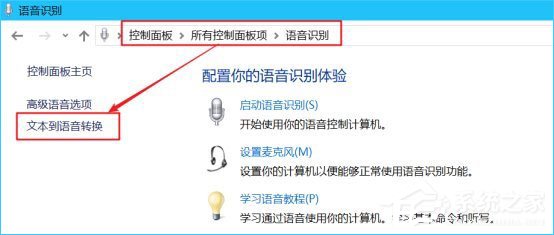
圖3:選擇小娜的語音
3、下面貼一段用PowerShell閱讀小說的代碼,同樣保存為.ps1文件,然后在.ps1文件上右鍵,選擇“使用“使用PowerShell運行”,之后把txt小說拖到PowerShell窗口中,回車,小娜就會自動為你朗讀小說了,再次回車就會退出朗讀!
01= Read-Host -Prompt "把小說拖到此處并回車開始朗讀"02= New-Object -ComObject SAPI.SpVoice03.Speak(,5)04Read-Host -Prompt "回車退出朗讀"復制代碼= Read-Host -Prompt "把小說拖到此處并回車開始朗讀"= New-Object -ComObject SAPI.SpVoice.Speak(,5)Read-Host -Prompt "回車退出朗讀"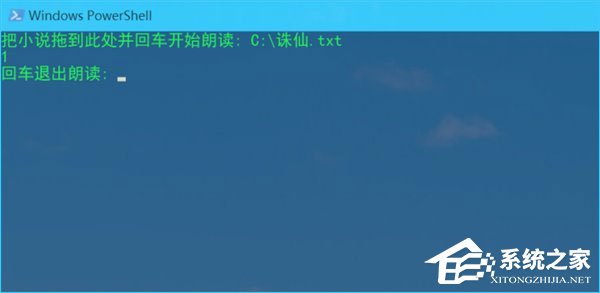
圖4:使用小娜朗讀小說
上述便是讓Cortana為我們朗讀小說的操作方法,喜歡閱讀的伙伴,如果看書看累了,不妨讓小娜為您朗讀哦!
相關文章:
排行榜
 網公網安備
網公網安備