WIN10 hosts文件為什么是空白的
很多小伙伴們在使用win10系統(tǒng)進行電腦操作的時候,都會有需要打開系統(tǒng)hosts文件進行處理的情況,不過有時我們在打開hosts文件時,發(fā)現(xiàn)文件內(nèi)容居然是空白的,這個情況是不應(yīng)該出現(xiàn)的,所以小編搜集了全網(wǎng)資料,以下面這篇文章的形式為大家解讀一下這個問題如何解決,感興趣的小伙伴們可以往下看!

找到hosts文件,其中有兩種方法:
一是通過路徑查找:
c:windowssystem32driverstc
二是通過運行(快捷鍵Win+R)輸入“路徑”查找。
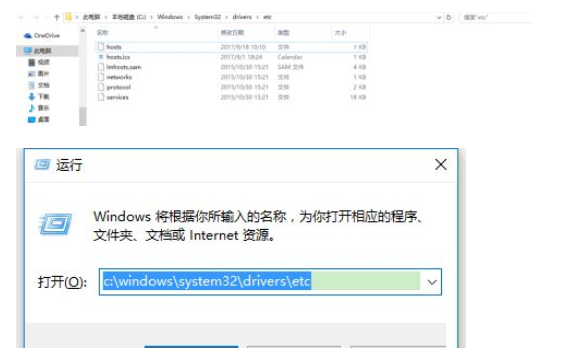
進入文件夾以后,找到hosts文件,如果打開為空,則復(fù)制以下內(nèi)容保存即可。(如果出現(xiàn)不能編輯的情況,先把hosts文件復(fù)制到桌面,修改保存以后,在復(fù)制回到該路徑下)
# Copyright (c) 1993-1999 Microsoft Corp.
#
# This is a sample HOSTS file used by Microsoft TCP/IP for Windows.
#
# This file contains the mappings of IP addresses to host names. Each
# entry should be kept on an individual line. The IP address should
# be placed in the first column followed by the corresponding host name.
# The IP address and the host name should be separated by at least one
# space.
#
# Additionally, comments (such as these) may be inserted on individual
# lines or following the machine name denoted by a ‘#’ symbol.
#
# For example:
#
# 102.54.94.97 rhino.acme.com # source server
# 38.25.63.10 x.acme.com # x client host
127.0.0.1 localhost
看了這么多,你學(xué)會了嗎?想要獲得最新資訊就來IE瀏覽器中文網(wǎng)站!簡單易懂的軟件教程、令人耳目一新的游戲玩法這里統(tǒng)統(tǒng)都有,更多精彩不容錯過!
相關(guān)文章:
1. 微軟重新構(gòu)建win11記事本應(yīng)用 功能和界面煥然一新2. win8通過優(yōu)化解決經(jīng)常死機的問題3. win101803更新升級190960%失敗怎么辦4. Mac電腦安裝Windows10教程5. win7系統(tǒng)中提示未授予用戶在此計算機上的請求登錄類型的具體處理方法6. Windows Defender防火墻更新了什么7. win10系統(tǒng)不能新建文件夾的解決方法8. 緊跟Win8.1Update Win7IE11增企業(yè)模式9. 秘籍:WinXP應(yīng)用技巧大總結(jié)(二)10. Fedora系統(tǒng)怎么設(shè)置打開新終端時默認(rèn)打開新標(biāo)簽頁?
 網(wǎng)公網(wǎng)安備