JavaScript實(shí)現(xiàn)簡單日期特效
JavaScript之日期特效的具體代碼,供大家參考,具體內(nèi)容如下
直接上代碼:
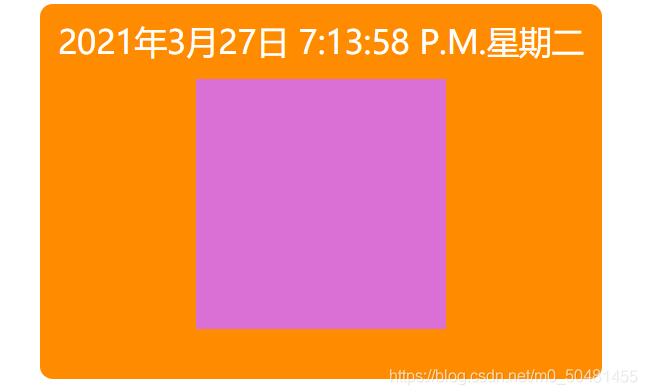
<!DOCTYPE html><html lang='en'><head> <meta charset='UTF-8'> <title>Title</title> <style type='text/css'>*{ padding: 0; margin: 0;}#date{ width: 450px; height: 300px; background-color: darkorange; border-radius: 10px; margin: 100px auto;}#nowDate{ width: 450px; height: 60px; line-height: 60px; text-align: center; color: #fff; font-size: 26px;}#day{ width: 200px; height: 200px; line-height: 200px; background-color: orchid; margin: 0 auto; text-align: center;} </style></head><body> <div id='date'><p id='nowDate'></p><p id='day'></p> </div> <script type='text/javascript'>// 獲取標(biāo)簽var nowDate = document.getElementById('nowDate');var day = document.getElementById('day');// 用定時(shí)器 更新時(shí)間的變化setInterval(nowNumTime,1000);nowNumTime();function nowNumTime(){ var now = new Date(); var hour = now.getHours(); var minute = now.getMinutes(); var second = now.getSeconds(); var temp = ’’ + (hour>12 ? hour-12:hour); var year = now.getFullYear(); var month = now.getMonth(); var d = now.getDate(); var week = now.getDay(); console.log(week); //索引 var weeks = ['星期天','星期一','星期二','星期三','星期四','星期五','星期六']; // console.log(temp); if (hour ===0){temp = ’12’; } temp = temp + (minute <10 ? ’:0’:':'+minute); temp = temp + (second <10 ? ’:0’:':'+second); temp = temp + (hour>=12 ? ’ P.M.’:’ A.M.’); temp = `${year}年${month}月$dv2sxagv日 ${temp}${weeks[week]}`; // console.log(temp); nowDate.innerHTML = temp;} </script></body></html>
實(shí)現(xiàn)效果圖:
以上就是本文的全部內(nèi)容,希望對大家的學(xué)習(xí)有所幫助,也希望大家多多支持好吧啦網(wǎng)。
相關(guān)文章:
1. IntelliJ IDEA刪除類的方法步驟2. IntelliJ IDEA創(chuàng)建web項(xiàng)目的方法3. docker /var/lib/docker/aufs/mnt 目錄清理方法4. 詳解PHP laravel中的加密與解密函數(shù)5. IntelliJ IDEA導(dǎo)出項(xiàng)目的方法6. 如何用JS實(shí)現(xiàn)簡單的數(shù)據(jù)監(jiān)聽7. IntelliJ IDEA配置Tomcat服務(wù)器的方法8. Intellij IDEA 關(guān)閉和開啟自動(dòng)更新的提示?9. 刪除docker里建立容器的操作方法10. IntelliJ IDEA設(shè)置默認(rèn)瀏覽器的方法

 網(wǎng)公網(wǎng)安備